zondag 17 januari 2016

7 Principles of Programming - 2

Principle 2

After seeing principle 1, most people are astounded how easy programming has become.
It has allready exceeded their expecations of what they are capable of. That is a nice moment to go on to something slightly more complex.

Conditions and expressions.
var b=1;
var a=2;
if(b>0) a=a+1;

This needs a line by line explanation. b=1, a=2, we know those.
the if statement is new. It means: if b is bigger than 0 do whatever comes next.

b>0 (b is bigger than 0)
b>=0 (b is bigger than or equal to zero)
b<0 (b is smaller than 0)
b<=0 (b is smaller than or equal to zero)
b==0 (b is exactly zero)

Stick to integer math and you'll be fine.

The next thing you might want to know is the else statement.
var b=1;
var a=2;
if(b<0) a=a+1;
else a=a-1;

This means, if the statement or 'expression' in between the ( ) is true, do the first thing after if. If it is NOT true, do the first thing after else.


This is very handy. In a flow chart it is presented as such:
If you are not familiar with flow-charts, never mind. If you are, this might help you 'translate'
It is good to consider how a program reads a program at this point.
It always moves from the top, to the left. When it reaches the end of the line, it will go to the next line.
But...
If it encounters certain statements, like if this behaviour briefly changes. It can jump and the jump back.
In the case we presented only for one instruction.
So what if you want to have a couple of things happen if the statement is true?
You make a block with { and  }
Everything inside the block is considered the 'thing' after if and will be executed as a whole before moving on.
var b=1;
var a=2;
if(b>0)
{
a=a+1;
        a=a*a+1;
}
else a=a-1;

So because B>0 the block is executed, a becomes 3 and then it becomes 3*3+1=10.


Here we see indenting for the first time. There are several schools of thought on this. This is mine.
The idea is, that you find the { on the same indent-height as it's } counterpart. Not everybody agrees this is the 'right' way to do it.
You will also see this:

var b=1;
var a=2;
if(b>0){
a=a+1;
        a=a*a+1;
}else a=a-1;

It means exactly the same thing.

Ok, in the same way we might make a block for anything after else.
This is your work. Test it, change it, hit run, see what happens.
Get into the habit of forming a hypothesis and testing every bit of it.
For instance try to predict what:
var b=1;
var a=2;
if(b>0)
a=a+1;
a=a*a+1;

would do and test it.

HOW TO TEST YOURSELF AND YOUR PROGRAM!

Form a idea of what will happen. Make sure you can see it happening by some output or feedback.
Always test your hypothesis by changing something from a working example (which you have tested yourself!) and then testing the change.
If it still works, that tells you something, if it doesn't that tells you something too.
Try to think of what both cases will tell you, before you test it.
Don't change a whole bunch of things before testing.
If you find it doesn't work at that point, it will be hard trying to find the problem.
If you change one thing, test and it doesn't work, the problem is ALWAYS with the last thing you changed.
Don't disregard unexpected results. They are a learning oportunity.
If you do this always, you will NEVER be unable to solve a bug, unless it is in some part of the program, that you don't have access to. (In this case, either Javascript or JSFiddle, both are quite stable)

Ok, so we learned about:
-expressions
-conditions
-branching (doing a bit of code in a differnt place before continuing with the flow of the program)
-code blocks
-testing.

This is a lot to take in. If you feel you need a break, take 10 minutes before coming back.

7 Principles of programming - 1


Principle 1

Variables.. I explain them like this:
A variable is like a little flat box. It has a label, that has the name of the variable.
You can put things in there.
You can make a box with "var";
You can put three kinds of things in there: numbers, characterstrings (not the same as words, because it can contain spaces and numbers and even linebreaks! Think of it as TEXT, if you will but call it a string) and objects.


The box can only contain one thing at a time.
If I put "hello world" in and then 1.547 the box will ONLY contain 1.547. "hello world" pops out and is lost in nothingness.


If you click the link, you will be redirected to a place on the web called jsFiddle.
Here you can play around with short bits of code to test a principle.

It is ideal for getting to understand a piece of code, because you can change it and hit run. You will see the result immeadeatly.
JSFiddle is NOT good for debugging. You need different tools for that.

I explain how a computer deals with numbers and character strings by showing the results of
var a=1+1;


and
var a=1-1;


Then I show the result of
var a="hello "+"world"


and of
var a="hello "-"world".


After that I ask what the difference is between var a="1"+"1" and var a=1+1.
Can you answer that? Why is the result of the last jsfiddle: NaN (meaning Not A Number)

Then I do this:
var b=1;
var a=2;
var c=a+b;


and I ask what C is. Most people get that. It's a good point to check if you are still with me.

Then we will start having some fun.
var a=5;
a=a+1;

If you are one of the rare people who find this exciting, we'd move on to things like.
a=a*a/2;
or even
a=a%4;
which will give you a little kick then. But most people don't like to go that far.
I think I've spent about a week in this stadium, imagining how I could get the computer to do ALL my homework. (I was 9 at the time)

Somewhere inbetween I will start putting comments in. They are color coded, which means people ignore them anyway.. But it's a nice moment to explain comments. It's not really a principle of

You will notice that I haven't touched objects yet, I just mention them. If you want to know why, read the red part. Else you can skip it for now.
In order to show the result in HTML I put it in a div, to create the div on JSFIDDLE
HTML: <div id="result"></div>

So I need to do this in Javascript:
  var result_box=document.getElementById("result");
and I use 
result_box.innerHTML=....
to show them the result when the page is loaded.

If anyone asks if document.getElementById("result") is a string or a number, I need a good answer.
The answer is that document.getElementById produces an object. And I leave a little mystery hanging there.
(Strictly speaking numbers and strings are a kind of built in object-instance, but hey.. We're just starting. That would only confuse you. I might mention it's a bit of a simplification, but it's not wrong! And it certainly helps you understand the concept of a variable, which was the idea.)


woensdag 6 januari 2016

Math problem - Circles

http://www.roytanck.com/2016/01/04/math-problem-why-does-this-work/

Roy states the following problem The length of the white area, which composes the outer shape if for each circle: d= (360/number_of_circles_in_graph)*2 , where d = degrees.
This is more or less correct.

Now let's look at that.
For 0 circles it would be (360/0)*2=infinity degrees. You go around endlessly.. ok..
For 1 circle it would be (360/1)*2=720 degrees. You go around twice.
For 2 circles it would be (360/2)*2=360 degrees. You go around once.
For 3 circles it would be (360/3)*2=240 degrees. You go around 2 thirds.
For 4 circles it would be (360/4)*2=180 degrees. You go around half a circle
For 5 circles it would be (360/5)*2=144 degrees. you go around 2 fifths of a circle.
If you don't look too hard at the first cases with one circle and zero circles it works.
Why?

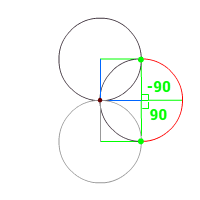
The circle are rotated around a point, let's call that x:0,y:0 or o. (dark red)
In the case of four circles, we create the first circle at 0,0, at an angle of 0 degrees.
And place the midpoint away from o.
How far: exactly the radius of the circle.
The previous circle will be at 360/4= -90 degrees. Also placed a distance of the radius away from o.
To get to the 'outline' we have to look at the next circle as well at 90 degrees.


The green point is at the beginning of the arc along the current circle, that together with the arcs on the other circles form the 'outline'. (The red bit)
The startpoint of this arc must be on both the next (top) and current circle (left).
There are only two points, that qualify. o (dark red), which is by definition 'inside' and the green point.

Because the point is on both circles, the angle from the midpoint of the current circle to the green point is 90 degrees. This angle echos the creation of the circles: It's a repetition of the circle's original rotation.
The same must be true for the previous circle at 90 degrees. To get the total angle of the arc: from -90 to 90 = 180 degrees.
This is true for 4 circles, but it works for any amount of circles higher that 2. (2 itself is a bit mind-bending, but I think the same principle applies)

To show you this is true, we look at the situation for 5 circles. The angle to get the next circle is -72
 -(360/5) and the angle to get the previous one is 72 (360/5). (or the other way around, depending in which direction you draw your circles)
If you set up the lines again, you see that the 'outer' arc must be those two angles combined, so 2* 360/5= 2*72=144
Your formula is implied in the problem.

NOW>>>
If the circles did NOT intersect at the origin this formula wouldn't work.
The formula would then be d=(360/nr_of_circles+a)*2
Where 'a' would be a function of the (distance to the origin of the midpoint - radius of circle) or the distance to the closest point on the circle and having a range, because at some point the circles would stop touching at all. This range would be zero to zero for two circles and slightly bigger for each additional circle, with a limit at a zero to triple the circle radius (where no circles would ever touch).


woensdag 16 december 2015

Microsoft en Spamklacht.nl

Hier komen details rondom een klacht ingediend bij
https://www.spamklacht.nl/

Ik kreeg deze e-mail, nogal een flinke Rich HTML e-mail. Dat is op zich irritant, maar de inhoud is dat nog meer. Het is een commerciele e-mail, geen informatieve:

De feiten:
  • Ik ben een klant.. Ik heb een product afgenomen bij microsoft. Namelijk windows 8. Na verloop van tijd, kreeg ik in windows 8 ongevraagd popups om windows 10 te installeren.
    Na flinke tijd (paar maanden) heb ik maar toegegeven, want ik vind het wel prettig ongestoord te werken en tenslotte horen updates erbij, ook als ze naggen..
    Bij het installeren van windows10, was het verplicht een account aan te maken en daarbij een email adres op te geven. Alle mogelijkheden die ik had om e-mail te voorkomen op dit e-mail adres, heb ik te benut.
  • Nu kreeg ik een mail, zonder unsubscribe erin
  • In de mail werd aangekondigd dat het om een serie e-mails gaat. 1/2
  • Ik heb geen opt-in aangeklikt of anderszins aangegeven dat ik hiermee akkoord was.
  • Het email adres, waaraan deze mail was gericht heb ik exclusief aan microsoft gegeven, voor mijn (verplichte) microsoft-account
  • Via een chat, aangegeven in de mail, kwam ik bij de verborgen subscription manager, ingebouwd in Edge. Hier bleek, dat ik geen e-mail subscriptions had. (Tenminste niet geregistreerd bij Microsoft)
  • Toen de medewerker dit hoorde, zei hij dat het dan geen mail van Microsoft kon zijn: die hebben altijd een unsubscribe en worden alleen met opt-in verstuurd.
    Nou, niet dus. Zie screenshot.
Ik kan hieruit niet anders concluderen, dan dat Microsoft zich niet houdt aan de Nederlandse privacywet uit juli 2009, waar een opt-in en een unsubscribe verplicht werden gesteld.
(meer info: http://www.frankwatching.com/archive/2009/05/18/de-nieuwe-wetgeving-rond-e-mailcommunicatie/)
Deze wet had een terugwerkende kracht, dus al had men mijn e-mail adres langer al in bezit bij het passeren van de wet, dan had men tot augustus 2009 om alsnog mijn opt-in te verkrijgen.
Dit is echter niet het geval, mijn opgeven van mijn e-mail adres aan windows is van na 2013 (preciezere datum weet ik helaas niet).

Als het puur en alleen informatie was, dan had ik het wellicht laten gaan, maar het gaat om een zeer wervende, commerciƫle mail, met loze kreten als "Het windows dat je kent, maar dan beter"
"Je apparaat gebruiken" (Sorry, maar windows, ook windows10 is NIET mijn apparaat!) Reclame voor microsoft Edge (maar gek genoeg geen informatie, hoe je uitsluitend via Edge bij de unsubscribe pagina komt) "Wij zijn er om je te helpen" "Ontdek alles wat je als microsoft-account kunt doen" en  "Laten we contact houden" en tenslotte nog een "volg ons op" voor diverse sociale media.
Verder was er weinig feitelijke informatie, maar wel allerlei links, die algemeen toegankelijke toepassingen probeerden op te starten. Het nut daarvan is zeer discutabel.
Zelfs al was het alleen informatie, dan nog was het informatie, waarom ik niet had gevraagd.

Ik kan alleen maar zeggen: foei, Microsoft, niet meer doen, anders zie ik mij genoodzaakt het aan u verstrekte e-mail adres te blokkeren, waardoor we echt niet meer kunnen communiceren.

Echter, na enig googlen, (niet bingen) kwam ik op spamklacht.nl
We kunnen dus WEL meer doen.
Ik heb mijn klacht ingeleverd, hopende, tegen beter weten in, dat Microsoft zijn leven betert.
Een operating system is geen handig sales-kanaal, maar zo ziet microsoft het wel.

Dit is het derde bewijs op rij,

  1. Druk maar eens op prt-scrn en je krijgt reclame voor microsoft-drive, de printscreen functie is uitgeschakeld totdat je hier opt-out.
  2. Installeer Windows10 en je standaardbrowser is opeens EDGE, ook al wil je dat niet en heb je dat expliciet aangegeven.. 
  3. Installeer Windows10 en je standaard zoekmachine is BING, ook al heb je deze eerder verwijderd als zelfs maar een optie.
Alles bij elkaar, denk ik dat we deze problemen nog wel een paar keer tegenkomen.
En ik persoonlijk heb er genoeg van.

Hieronder nog de chat met Christian van Answer Tech, naar eigen zeggen de factureringsafdeling. Volgens Christian was er geen afdeling die zich bezig hield met privacy. 


Overigens zeg ik hier dat het gaat om een wet uit augustus 2012, maar dat was een Europese wet, die er niet door is gekomen. Ik vergiste me.

dinsdag 24 november 2015

Snoep Games test Legenda

Dit zijn de devices waarop wij onze games actief testen.
Over het algemeen moet gelden: nieuwste browser werkt.
Er zijn echter veel oude apparaten in omloop.

Test Legenda 

Devices en browsers in testing as of today..

Mobiele devices


  • Android phone - Honor Holly (android v KitKat)
  • [APD] Default browser  (Chrome 30)
  • [APC] Chrome 46 


  • Android Tablet - Samsung Galaxy Tab3 lite SM T110 (android Jellybean)
    • [ATD] Android Default Browser 4
    • [ATD] Chrome 46
  • Ipad
    • [IPS] Safari (IoS8)
  • Desktop devices

  • Windows7
    • [W7C] Chrome
    • [W7IE] Internet Explorer
    • [W7IE] Firefox
  • Windows8.1 (met touch-screen)
    • [W8C] Chrome 46 
    • [W8IE] IE 11 
    • [W8FF] Firefox 42
    • [W8FF] Opera 33
  • Windows10 desktop zonder touch screen
    • [WXFF] Firefox
    • [WXS] Safari
    • [WXC] Chrome 46 on Windows 10
    • [WXE] EDge (nieuwe browser windows 10)
  • Mac Airbook laptop zonder touch screen
    • [MCC] Chrome
    • [MCS] Safari
  • NET GELUKT!

    Ik had dit jaar een zware hernia, waardoor de spelletjes van het Sinterklaasjournaal iets minder lekker en snel gingen dan gemiddeld. Gelukkig waren het er maar zes dit jaar.

    SnoepGames test pagina..

    Maar hier zijn ze dan, 1 uur voordat het laatste spelletje live gaat (dagkadootje van vanavond om.
    Eerder vanmiddag 16:00pm had ik al een versie geleverd, die misging met Firefox, Internet Explorer en Edge.
    De rest van de browsers werkte wel en iets is beter dan niets.
    Maar na nog drie kwartier debuggen met Edge is de fout eruit.

    Hij krijgt groene vlaggetjes op ALLE testplatforms.


    Morgen ga ik aan de support werken voor het Sinterklaasjournaal. Er zijn al wat klachten binnen gekomen, maar ik krijg vooral dit soort 'bugs':

    ------------------
    Contact info
    ------------------
    platformstring: Mozilla/5.0 (Windows NT 6.1; Trident/7.0; SLCC2; .NET CLR 2.0.50727; .NET CLR 3.5.30729; .NET CLR 3.0.30729; Media Center PC 6.0; .NET4.0C; InfoPath.2; Media Center PC 5.0; OfficeLiveConnector.1.5; OfficeLivePatch.1.3; SLCC1; .NET4.0E; Tablet PC 2.0; GWX:QUALIFIED; HYVES; rv:11.0) like Gecko
    HybridVersion: 1.2.2
    GameVersion: 1.0
    ------------------
    bug: over 1 week is het pakjesavond!!!!!!!!!!!!!!!!!!!!!!!!!!!!!!!!!!!!!!!!!!!!!!!!!!!!!!!!!!!!!!!!!!!!!!!!!!!!!!!!!!!!!!!!!!!!!!!!!!!!!!!!!!!!!!!!!!!!!!!!!!!!!!!!!!!!!!!!!!!!!!!!!!!!!!!!!!!!!!!!!!!!!!!!!!!!!!!!!!!!!!!!!!!!!!!!!!!!!!!!!!!!!!!!!!!!!!!!!!!!!!!!!!!!!!!!!!!!!!!!!!!!!!!!!!!!!!!!!!!!!!!!!!!
    ------------------

    Leuk, maar het zijn er ondertussen al een stuk of 40, dus ik heb meer tools nodig om het kaf van het koren te scheiden. Morgen heel benieuwd of er nog 'echte' bugs overblijven.


    vrijdag 6 november 2015

    DrakenCurve

    9e generatie drakencurve

    Wat is de drakecurve?

    Je begint in een willekeurige richting en op een willekeurig punt op een ruitjes papier en slaat volgens recept linksaf of rechtsaf.
    Zo'n recept ziet er zo uit:
    r r l r r l l r r r l l r l l
    Als je het recept volgt, krijg je dit:
    (in dit geval begonnen we op de rode punt en in de richting naar rechts, 
    je slaat als eerste af, (r=rechtsaf), dus dat wordt een streepje naar beneden!
    Daarna nog eens rechtsaf, dus streepje naar links, dan linksaf, dus streepje naar beneden.. etc etc.)

    Dit is een 3e generatie drakencurve.
    Hoe hoger het aantal generaties, hoe langer het recept wordt en hoe complexer de curve.

    generatie 1) r
    generatie 2) rRl
    generatie 3) rrlRrLl
    generatie 4) rrlrrllRrrlLrll
    generatie 5) rrlrrllrrrllrllRrrlrrlLrrrllrll

    Formule voor het maken van het drakencurve recept:

    0) begin met r.
    1) Schrijf de vorige generatie in zijn geheel opnieuw op
    2) voeg r toe (de vette R in het recept)
    3) schrijfvorige generatie nog een keer op, maar verander de middelste van de reeks (van R naar L of andersom) (de rode L in al bovenstaande stappen)
    4) begin weer bij stap 1)

    Het gaat vrij snel, met 9 generaties, heb je al 2047 bochtjes te tekenen. Maar de figuur wordt steeds mooier.


    Zelf tekenen?

    Er zijn mensen die voor de lol deze curves tekenen. Volgens mijn vrouw, Marjolein, is het leuker dan puzzelen. Het is een uiterst secuur werkje. Je weet al vrij snel of je het fout doet, want een drakencurve gaat NOOIT TWEE KEER OVER DEZELFDE LIJN!
    Voor mij zou het niks zijn, ik schrijf voor dat soort dingen een programmaatje, zoals hieronder.

    Download dit plaatje en print het zo groot mogelijk op een A4.
    Maar goed, probeer het zelf: Download het bovenstaande hokjes vel, waar precies een negende generatie op past en probeer hem te maken. Begin bij het puntje en volg de richting van het eerste streepje.
    Het recept voor een 9e generatie drakencurve kun je hieronder vinden.
    Vul een cijfer in voor het recept en druk maar op GO! (maar wees voorzichtig, voor meer dan 9 kon het wel even gaan duren en loopt hij van het papier af..)

    Meer info:
    https://en.wikipedia.org/wiki/Dragon_curve

    Generaties: